The Architectural Illusion of Retrofitted Accessibility: Unified Service Design for Public Sector Portals
Contents
The most expensive phrase in enterprise and government digital procurement is: “We will run an accessibility audit right before launch.”
When digital accessibility is treated as a late-stage compliance check rather than a foundational architectural constraint, the result is catastrophic. Web applications built this way end up with patched-together UI components (such as non-semantic <div> buttons with custom JavaScript listeners glued on top), broken keyboard navigation loops, destroyed screen reader DOM trees, and bloated technical debt.
For public sector portals and large-scale enterprise services—where user journeys are fraught with complex administrative workflows and legal mandates—accessibility cannot be bolted on at the Surface plane. True digital inclusion requires unified service design embedded across every layer of the engineering stack from day zero.
Industry Benchmark Data:
According to classical software lifecycle research from the IBM Systems Sciences Institute and NIST (National Institute of Standards and Technology), fixing a structural defect in production costs between 30x to 100x more than addressing it during the initial design and requirements phase. (https://totalshiftleft.com/blog/why-bugs-keep-reaching-production)
In digital accessibility engineering, Deque Systems projects a 100x cost multiplier for late-stage remediation. While a design-level fix costs an estimated $100–$250 in developer and designer labor, retrofitting an inaccessible production platform requires cascading DOM refactoring, breaking changes to CSS architecture, complete design system updates, and manual assistive technology re-auditing—escalating remediation costs to $10,000+ per major structural defect. (https://betterqa.co/bug-fixing-costs-throughout-sdlc/)
The math: A bug that takes 30 minutes to fix in requirements takes 2-5 days and $10,000+ to fix in production.
The “Accessibility Bolt-On” Anti-Pattern in High-Bureaucracy Environments
Large-scale government platforms operate under unique organizational friction. Key stakeholders are often isolated behind layers of bureaucracy, development is contracted out to multi-tier vendors, and project specifications handle accessibility with a hand-waving requirement like “Must comply with WCAG 2.2 AA.”
Without explicit architectural governance, engineering teams build the entire portal around visual mockups created for sighted, mouse-using users. Accessibility audits are scheduled weeks before the go-live date as a checkbox exercise for legal sign-off.
Whenever I open a website, I can’t help analyzing how it was built—it’s just an automatic habit from working in software for so long. I often land on huge government or corporate portals, spot obvious design flaws right away, and immediately map out a plan in my head to fix them.
But then reality hits: actually fixing it is a massive nightmare for the site owner. In public sector projects, making even a tiny change means going through endless approvals, committees, and contract reviews.
The sad truth is that these sites will stay broken for years—sometimes over a decade—and everyday people will struggle to use them every single day. That is the real price you pay for messing up the foundation from day one.
OLD RETROFIT WAY:
Build the site (And nowadays you could add "using AI/Vibe Coding without quality developer") ──> Realize it's broken ──> Try to patch it ──> Break the UIBUILT-IN INCLUSION WAY:
Set rules early ──> Design simple paths ──> Build clean components ──> Test before launch When the late-stage audit inevitably fails, developers scramble to apply surface-level patches:
- Slapping aria-label attributes onto non-semantic <div> elements without fixing focus state management.
- Overriding CSS layouts with brute-force visual fixes that break responsive reflow and zoom capabilities.
- Injecting third-party accessibility overlays or “widgets” that actively interfere with native screen reader functionality and fail statutory compliance checks.
The outcome is an inconsistent, fragile user experience that fails end users and exposes public institutions to legal liability under standards such as EN 301 549, WCAG 2.2 AA, Section 508, and national digital government frameworks (such as Saudi Arabia’s DGA Digital Accessibility Guidelines).
Deconstructing Public Portals Through the 5 Planes of UX
To prevent accessibility failures in public sector software, architecture teams must apply Jesse James Garrett’s Five Planes of UX Framework (Strategy, Scope, Structure, Skeleton, Surface) as a unified accessibility framework.
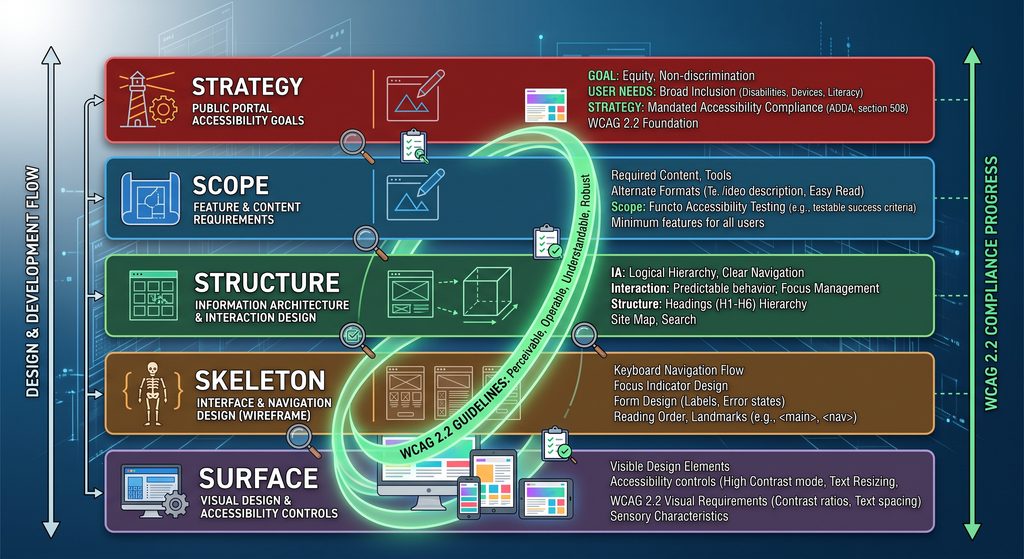
1. The Strategy Plane: Statutory Mandates as Product Vision
Accessibility begins with strategic intent. In government services, accessibility is a fundamental civil rights requirement ensuring equitable access to public services.
- Establish WCAG 2.2 Level AA and EN 301 549 as non-negotiable success metrics in procurement contracts.
- Define target user personas that explicitly include citizens relying on assistive technologies (e.g., NVDA, JAWS, VoiceOver, switch devices, and high-contrast display modes).
2. The Scope Plane: Deciding What Features & Content to Include
The Scope plane defines what features actually belong on the portal and what information users need to complete their task.
- Eliminate redundant steps: Audit long bureaucratic forms and strip out unnecessary fields, extra clicks, and outdated requirements that waste people’s time.
- Use simple, everyday language: Translate dense legal jargon into clear, direct text that anyone can easily read and understand.
- Provide text descriptions for visual data: Always include written text summaries alongside complex charts, maps, or diagrams so screen readers can explain the exact same data to visually impaired citizens.
3. The Structure Plane: Organizing How the Portal Works
The Structure plane controls how users move through the site and navigate multi-step administrative processes.
- Make multi-step tasks predictable: Design application forms so users always know where they are, what step comes next, and how to fix mistakes without losing their progress.
- Set a logical tab order: Map out how keyboard and screen reader users will move through the page (from header to main content to footer) before writing any code.
4. The Skeleton Plane: Building the Interactive Controls
The Skeleton plane determines how individual buttons, forms, and menus actually behave when someone clicks or taps them.
- Use standard web elements: Build buttons, dropdowns, and popups using standard HTML controls (<button>, <select>) instead of custom shapes, so screen readers automatically know how to interact with them.
- Make buttons big enough to tap: Ensure every button or link is large enough (at least 24×24 pixels) so citizens with hand tremors or those on mobile screens can tap them without misclicking.
5. The Surface Plane: Fine-Tuning Colors & Final Visuals
The Surface plane is the final visual layer—the colors, fonts, and visible highlights seen on screen.
- Use high color contrast: Choose text and background colors with strong contrast so people with low vision or anyone reading a screen in bright sunlight can read the content effortlessly.
- Keep keyboard focus indicators visible: Never remove the visual outline box that appears when someone tabs through links or buttons with a keyboard, so users always know where they are on the page.
Comparing Architectural Approaches
| Architectural Plane | Traditional Retrofit Model | Systemic Accessible Service Design |
|---|---|---|
| Strategy | Treated as an afterthought or compliance liability. | Established as a non-negotiable core project constraint. |
| Scope | Unbounded form fields and dense legal jargon. | Simplified workflows with mandatory plain-language rules. |
| Structure | Chaotic DOM order based on visual layout hacks. | Logical DOM hierarchy aligned with visual focus order. |
| Skeleton | Custom <div>-based widgets requiring hacky JavaScript event listeners. | Native HTML elements with standard keyboard accessibility baked in. |
| Surface | Color choices made solely for brand aesthetics; contrast fixed post-audit. | Theme engine enforcing automated contrast ratios and scalable dynamic typography. |
Progressive Disclosure: Balancing Legal Compliance with Visual Simplicity
Public sector platforms must convey complex legal rules without overwhelming citizens. Attempting to display every regulatory clause, sub-clause, and validation rule simultaneously causes cognitive overload for all users, particularly those with cognitive disabilities.
Progressive disclosure is the architectural pattern that resolves this tension. By presenting information in digestible, contextual steps, you maintain visual simplicity while preserving statutory completeness.
To execute progressive disclosure accessibly:
- Use native semantic controls (<details> and <summary>) or properly configured WAI-ARIA disclosure patterns.
- Ensure state changes (e.g., expanding an accordions or inline help block) are instantly announced to screen readers via appropriate state attributes (aria-expanded=”true|false”).
- Keep DOM elements in logical reading order so screen reader users do not experience unexpected focus skips when content expands.
Architectural Key Points:
- Native Baseline (<details> / <summary>): Native browser behavior handles keyboard focus, screen reader announcements, and DOM expansion automatically without writing custom JavaScript.
- Explicit ARIA Pairings: When custom UI constraints require JavaScript, linking aria-controls to the panel’s id and using the native hidden attribute ensures screen readers correctly recognize state toggles without broken focus states.
Making Accessibility Automatic in High-Bureaucracy Organizations
In big government or enterprise teams, you cannot just hope every developer remembers accessibility rules on their own. Instead, you must set up automated rules and quality checks directly inside your team’s software pipeline so inaccessible code gets caught and blocked automatically.
ENTERPRISE PIPELINE GOVERNANCE:
1. Design System Tokens ──> 2. Automated DOM Linting (axe-core) ──> 3. CI/CD Build Gate ──> 4. Manual Assistive Tech AuditsHow to Enforce Accessibility Across Your Engineering Pipeline
- Build Accessibility into Your Shared Design System
Centralize UI components into a single, pre-audited design system. When buttons, modals, and form controls are accessible by default, every development team inherits compliance automatically without reinventing the wheel. - Block Inaccessible Code in Automated Build Checks (CI/CD)
Integrate automated DOM testing tools (such as axe-core or Pa11y) directly into your continuous integration pipeline. Configure build scripts to automatically reject pull requests if basic violations—like missing form labels, improper ARIA attributes, or invalid DOM hierarchies—are detected. - Mandate Manual Testing with Real Assistive Tech
Automated tools only capture 30% to 50% of accessibility defects. Require mandatory, hands-on QA gates using keyboard-only navigation and screen readers (NVDA, JAWS, or VoiceOver) at every major milestone before freezing code for release. - Tie Vendor Contracts to Formal Accessibility Audits (VPAT / ACR)
Hold external contractors and agencies accountable by requiring independently verified Accessibility Conformance Reports (ACRs based on VPAT standards). Make successful third-party compliance verification a mandatory prerequisite for releasing final project payments.
Accessibility as Enterprise Systems Architecture
Retrofitting accessibility at the end of the software development lifecycle is a fundamental engineering failure. It destroys user journeys, inflates software maintenance costs, and exposes public sector entities to severe legal and reputational risks.
Consider how absurd this reality actually is: launching a brand-new digital project, only to immediately schedule a massive accessibility remediation project to fix code that was just written? That is neither logical nor normal.
I am not saying you must rigidly adopt the “Five Planes of UX” or saddle your organization with another abstract, far-off strategic framework. You do not need textbook dogmatism to solve this problem, nor do you need to over-complicate your workflow.
What you need is a pragmatic, battle-tested approach guided by an experienced expert. By enforcing architectural governance from day one—whatever methodology you choose—enterprise leaders and solutions architects can deliver public services that are legally compliant, cost-effective, and fully usable by every citizen from the moment they go live.
